

The access review
Review access every quarter, describe the evidence expected at sign-off and let an overdue review move to whoever answers for IT security, not merely back to the person who forgot.
Internal controls
Give every control activity an owner, a cadence and a traceable sign-off. Kalends reminds in time, lets a stand-in take over during absence, flags what goes overdue and records what was done, by whom and against which evidence. The control plan becomes work that actually gets done and can be shown afterwards.
The control plan says access must be reviewed every quarter and suppliers assessed every year. But the activities live in spreadsheets, meeting notes and people's memories, and the gap appears only when the auditor or management asks for the outcome. The control may have been performed, but nobody can show when, by whom or against which evidence.
Review access every quarter, describe the evidence expected at sign-off and let an overdue review move to whoever answers for IT security, not merely back to the person who forgot.
Give the annual assessment an owner, a due date and a sign-off that remains until the next audit, even if the owner changed role during the year.
Let the monthly reconciliation count as complete only once a second person has approved it, as financial controls often require.
What you gain
The directive states what the area must uphold. The control activities are the recurring commitments that keep the directive true, each with an owner, a cadence and a sign-off.
Every control activity gets a named owner and a stand-in during absence, and what does not happen in time shows as overdue until it is done.
Sign off with a date, a note and a link to the evidence. The sign-off cannot be changed afterwards, a skipped occurrence requires a stated reason and a second signature can be required where needed.
See on-time rate, overdue controls and the trend by area. Open the figure and reach the control activity, the events and the evidence behind it.
From directive to control activity
A control plan states what must be upheld. Kalends places that as a directive on the area of the organisation and connects the recurring control activities that keep it true. Responsibility follows the area when people change.
For example that nobody has more access than their role requires. The directive sits on the IT security area and is visible to everyone working there.
The quarterly access review and closing accounts on departure are the commitments that make the directive real, each with a cadence, an owner and a sign-off.
A stand-in takes over during absence. When nobody is named on a control, whoever answers for the area is responsible, and an overdue control shows in the area's outcome until it is signed off.
Responsibility map
Standing directive
Nobody has more access than their role requires
Commitments that keep the directive true
Responsibility chain
Directly responsible
Anna
Stand-in
Johan
Area owner
Maria
The control continues. The cadence, ownership and sign-offs remain when people change.
Outcomes are reported by area. Whoever answers for the area sees which controls went overdue, can judge whether the delay matters and has the authority to get them done.
The sign-off
When a control is signed off, Kalends stores who did it, when, against which evidence and with what note. The sign-off cannot be edited afterwards. That is the difference between believing the control was done and being able to show it.
State what is expected at sign-off, for example a link to the review protocol. The guidance is shown to the signer and stored with the sign-off.
Mark the control activity as requiring approval. It counts as complete only once a second person has signed.
An occurrence that is not needed can be skipped, but only with a stated reason that is kept in the history.
Sign-offs are only ever added, never changed. Name, time, evidence and reason remain until the next audit.
The outcome
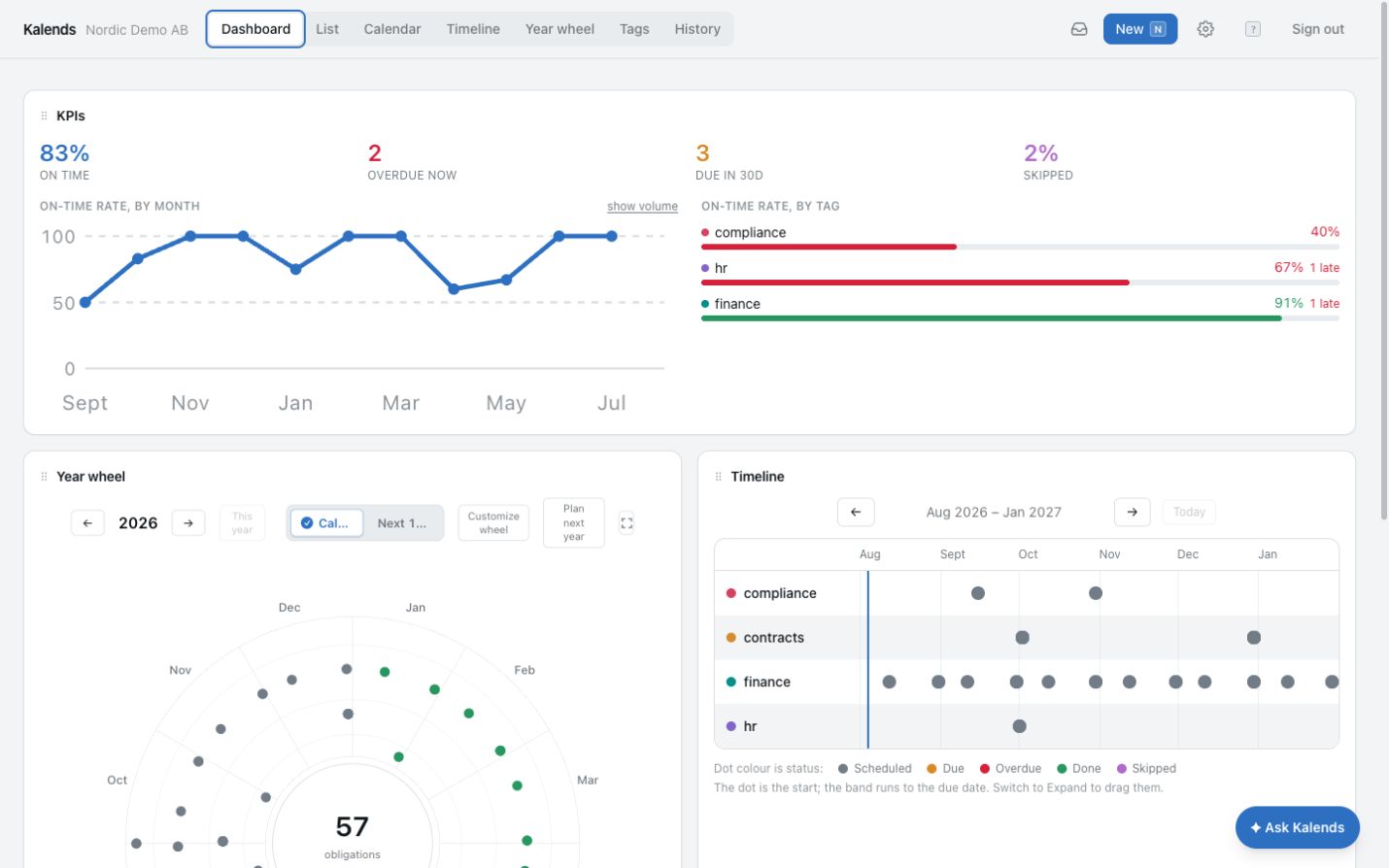
On-time rate, overdue controls, due within 30 days and skipped occurrences, by area and over time. Every figure opens into the control activities and the history behind it, so the report to management or the auditor never has to be assembled by hand.
92%
On time
4
Overdue now
17
Due in 30d
3%
Skipped
On time
92%
On time
On-time rate by month
On-time rate by area
In the product
The same control activities appear in the list, calendar, timeline and year wheel. The directive shows its tactical plan with outcomes, and the history shows every execution with time, person and evidence.
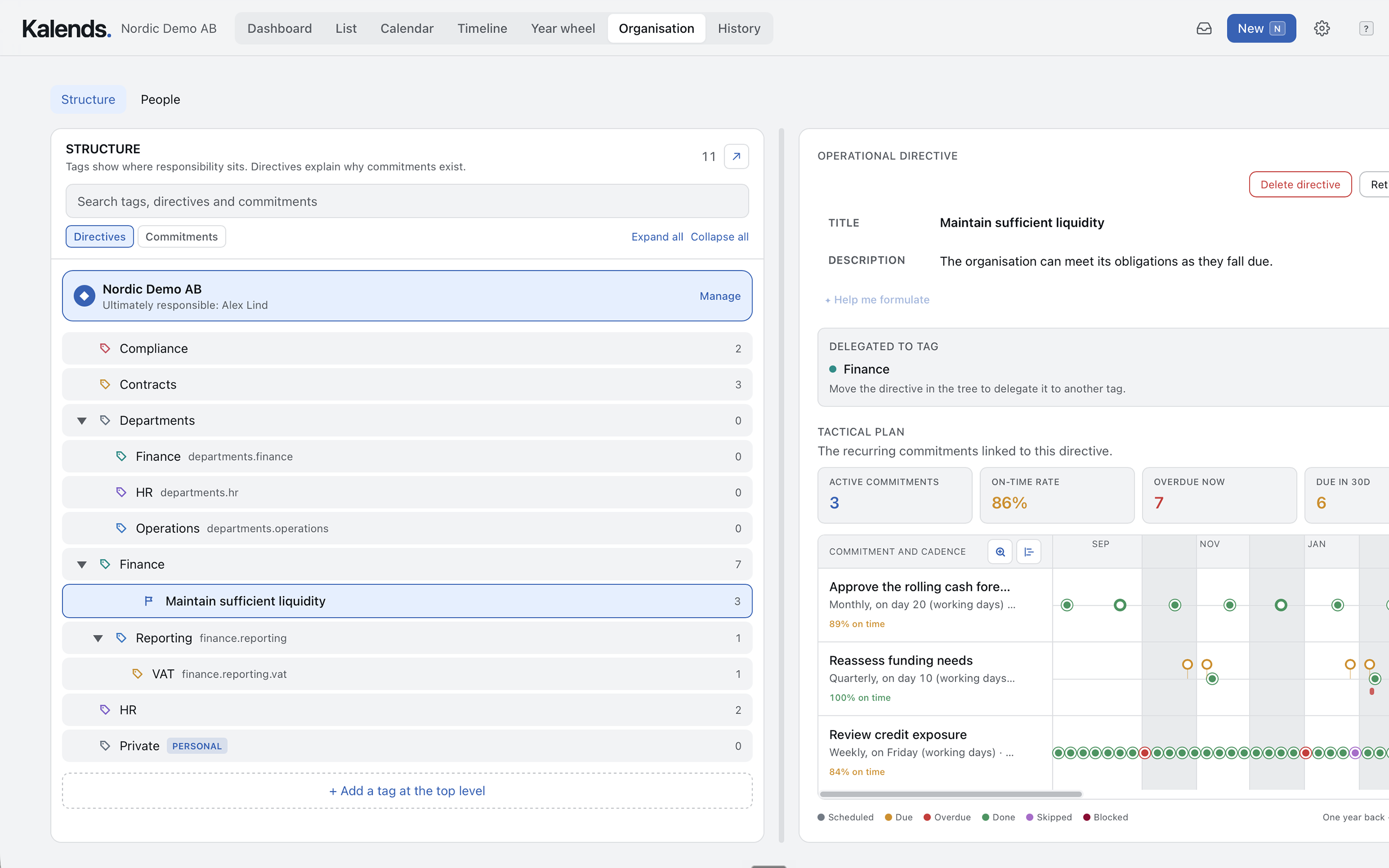
The directive sits on the area and shows the control activities that keep it true, with on-time rate, overdue now and due within 30 days.
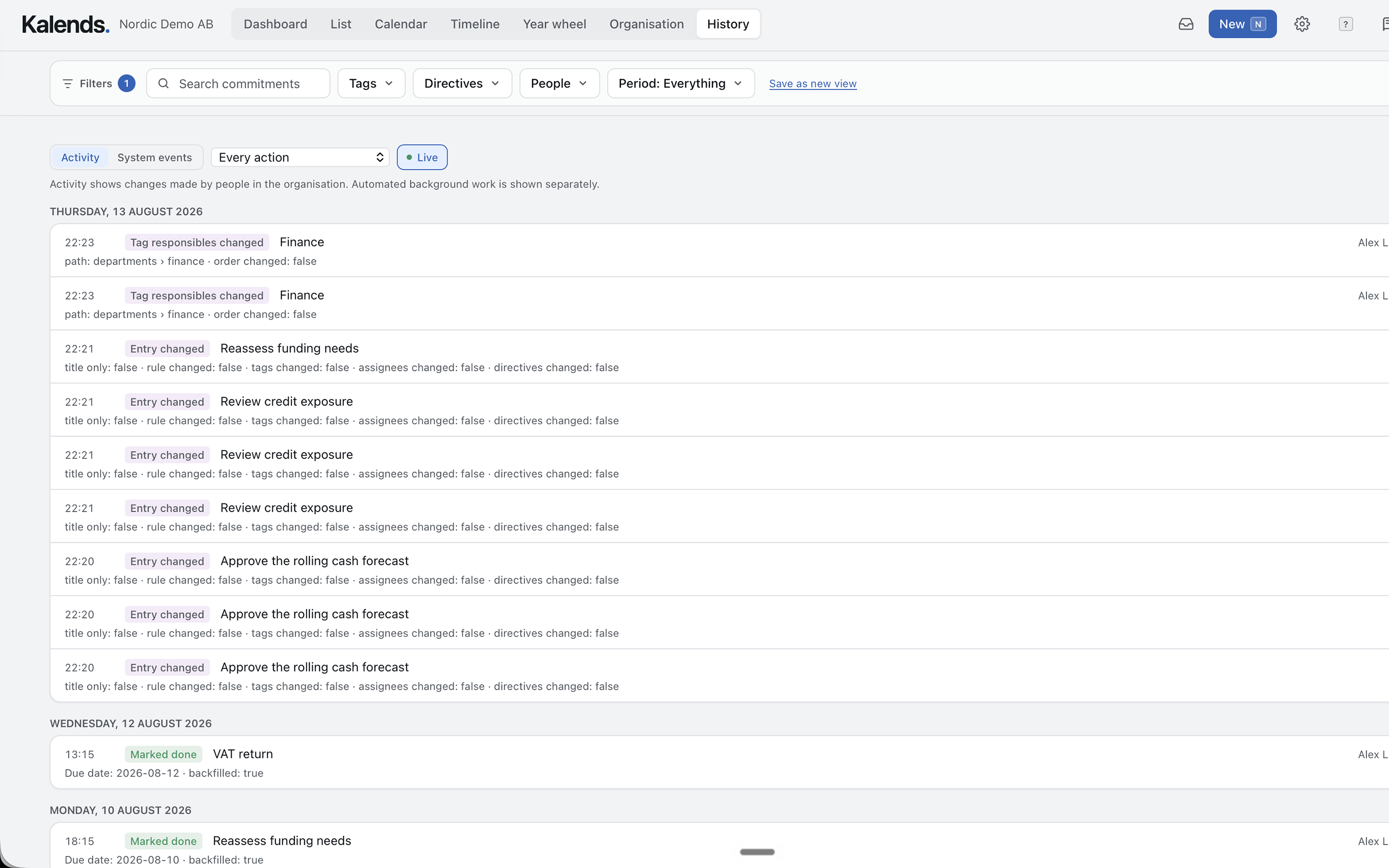
Filter by area, directive, person or period and see what was done, by whom and when. The same view is the evidence for the audit and the management review.
How to get started
Start with the controls that are critical, recurring or consistently difficult to follow up. The rest of the control plan can follow over time.
Place a directive on the area, for example that nobody has more access than their role requires. Several control activities can together uphold the same directive.
Set cadence and dates, owner and stand-in, and reminders. Describe the evidence expected at sign-off and whether a second person must approve.
See completion on time, delays and skipped occurrences by area, and open the history behind every metric ahead of the audit or the management review.
Common questions
No. A simple confirmation is enough for many activities. Describe on the control activity what evidence is expected when risk, regulation or your own control model requires it. The guidance is shown to the signer and stored with the sign-off.
The owner is reminded before the due date, or their stand-in during an absence. When the control goes overdue, its owner and everyone named on it get a notification. It stays overdue in the area's outcome, where whoever answers for the area sees it, until it is signed off.
Yes. Mark the control activity as requiring approval and it counts as complete only once a second person has signed. That suits financial controls and other activities where four eyes are a requirement.
The occurrence can be skipped, but only with a stated reason. The reason is kept in the history, so a deliberate skip can be told apart from one that was simply forgotten.
No. Every sign-off is stored with the time, the person, a note and a link to the evidence, and cannot be changed afterwards. Comments made while the work is in progress are separate and can be edited, but the sign-off itself endures.
Yes. On-time rate, overdue and skipped controls are shown by area and over time. Every figure opens into the control activities and the history behind it.
Filter the history by area, directive, person or period and see every execution with time, person, note and evidence. The same view serves as the evidence for the management review.
Start with one control
Add its purpose, cadence, owner and the evidence expected. Follow it through the next execution in Kalends and see whether the approach fits your internal controls.