Commitment register
Take control of your organisation's processes and commitments
Kalends brings recurring processes, customer promises and contractual requirements together with clear ownership and traceable follow-up.
No card details. No sales call.
| Due | Commitment | Tag | Owner | Status |
|---|---|---|---|---|
| 31 Mar | VAT return | finance.tax | Anna S | Overdue |
| 31 Mar | Monthly close | finance | Johan L | Due |
| 02 Apr | Access review | compliance | Erik N | Scheduled |
| 05 Apr | Supplier contract, notice window | contracts | Johan L | Scheduled |
| 12 Apr | Board pack | board | Anna S | Done |
What it is
Your company's register of processes and commitments
Ordinary calendars keep track of people's time: when, where and with whom they are meeting. To-do lists help individuals and teams keep order in work that has to get done.
Kalends keeps track of what the company itself has undertaken to do — recurring processes, promises to customers and obligations in contracts. Every commitment has an owner, a date, and a history of what happened.
The responsibility stays with the company, even when the person who created the commitment changes role or leaves.
Dates that follow the business
Set a rule that mirrors reality — the last working day of the quarter, 90 days before a contract renews, or the 12th of every month. Kalends works out the dates and handles public holidays and working days according to your rules.
Ownership that survives absence
Every commitment can have a named owner, a responsible team, or both. When somebody is away, the affected commitments move automatically to a named stand-in — without the company's long-term ownership disappearing.
Nothing important passes unnoticed
Reminders, and a timeline showing when commitments are coming up, give the people responsible time to act. If a commitment passes its due date without confirmation anyway, it escalates according to your rules.
Make the company's obligations measurable
When the people responsible confirm that a commitment is done, dashboards and metrics update. Management sees what is completed, late or escalated, and can follow the trend over time — with the history behind every figure.
What must not fall through the cracks?
A recurring process
Closing the monthly accounts.
A control step
Reviewing access rights every quarter.
An organisational promise
Holding the monthly sales meeting.
A legal duty
Filing the VAT return.
A watch point
Acting before a contract's notice period.
A time-bound obligation
Renewing a permit in three years.
Where commitments hide
Some commitments show up in the calendar. Others are scattered across the organisation
Behind the calendar booking there is a commitment
The monthly sales meeting is one occasion in the calendar. But the company's commitment is that the meeting actually happens every month, with the right owner and follow-up. It remains even if the invitation is moved, deleted, or the organiser leaves.
Calendar entry
Monthly sales meeting
10:00 · 8 attendees
Organisational commitment
Hold a sales meeting every month
The calendar shows the occasion.Kalends keeps track of the commitment behind it.
The commitment remains even if the calendar booking is moved, deleted, or the organiser leaves.
Commitments arise everywhere in the organisation
They may sit in a process document, follow from a contract, be described in minutes, or be handed over verbally. But without one place where ownership, dates and follow-up come together, they usually become visible only once they have not been done.
Scattered work with no calendar entry, owner or follow-up
Review access rights every quarter
Head of IT · Quarterly · Review signed off
Watch the notice period in the framework agreement
Contract owner · 90 days before renewal
Update the onboarding checklist
Head of HR · Twice a year · Version published
A named owner, a clear frequency, traceable follow-up
In Kalends these commitments get an owner, a rhythm and a follow-up too — exactly like the rest of the company's obligations.
If the calendar invitation vanished, would the organisation still need to make sure this happened? If so, it belongs in Kalends.
Traceability and follow-up
History and metrics for every commitment
Every commitment gets a traceable history with owner, timestamp, comments and evidence. Authorised administrators can follow the whole sequence of events afterwards, while KPIs show how often the commitment is met on time, runs late, escalates or is skipped.
- See who marked the commitment as done, when it happened and what evidence was attached
- See reminders, escalations, comments and changes in the commitment's history
- Measure how well each commitment works over time
- See which people or teams are often late or escalated
VAT return
Due 12 Mar (14 days ago) · Monthly, on day 12 (working days)
- Reminder sentto Anna Svensson · 12 Mar 08:00
- Escalated to managerno confirmation after 3 days · 15 Mar
- Comment“Waiting on the accountant, week 12” Johan L
- Marked doneAnna Svensson · 26 Mar · receipt.pdf
Every step is kept, in order, and stays readable years later.
Tags and access
Organise commitments your way
Create tags for departments, areas of work, customers, projects and responsibilities. Build hierarchies where there are natural levels, like Finance > Invoicing. A commitment can carry several tags, so the same work can be followed up from more than one angle.
Assign people to a tag, and the responsibility for everything under it gathers in one place. Tags also govern access: restrict a tag, and only the right people see its commitments.
Responsibility areas
51 commitments
24 commitments
11 commitments
4 commitments
18 commitments
5 commitments
9 commitments
Group and filter the work
Filter any view by a tag and see what a department or a team is responsible for. Get one collected picture of the commitments, instead of having them spread across different systems, documents and workflows.
Share out responsibility
Connect people to a tag to build a team around a shared area of responsibility. When a new colleague is added to the tag, they immediately get an overview of the commitments that belong to it.
Access that follows the structure
Mark a tag as restricted, and only the tag's members get access to its commitments. Restrict Finance, for instance, and every tag beneath it is restricted too.
Guests and private commitments
Invite outside people as guests to the tags they need to work with. They get access to exactly that bounded area, with no sight of the rest of the register. For personal commitments, every user can have a private tag visible only to its owner.
Responsibility and continuity
Responsibility that survives absence and organisational change
A named person can be responsible for a commitment, while tags provide the wider responsibility route. Kalends follows the first tag upwards through its parents, so work always has a visible place to fall back.
When somebody is away, an administrator can appoint a temporary stand-in for a known period or until further notice. If somebody leaves, each responsibility area and recurring commitment can be handed to the right successor.
Quarterly access review
Responsibility route
Kalends follows the route from the commitment upwards
Absence or handover
Anna Svensson
Situation
Temporary absence
Cover during the absence
Johan Lund
Period
3–21 August 2026
8 affected commitments
Johan receives reminders and escalations during the period.
A responsibility route, not just one name
See the directly responsible people first, followed by the responsible people on the commitment's tag and its parent tags. The route explains who acts next when the first person cannot.
Temporary cover with an automatic return
Set an inclusive end date and reminders and escalations return automatically afterwards. With an unknown return date, the person or an administrator can confirm when they are back.
A deliberate handover when somebody leaves
Transfer the recurring commitment itself from its next occurrence, rather than editing a long list of future dates. Different areas can have different successors.
Every change remains explainable
Cover, return and permanent handover are recorded in History. An administrator can undo the change without deleting the record of what happened.
Views
One register, several views
See the same commitments in more than one way.
List
A detailed register you can filter, sort and group by owner, status, date and tag.
Calendar
See commitments by day, week, month and year. Create and move them directly in the calendar.
Timeline
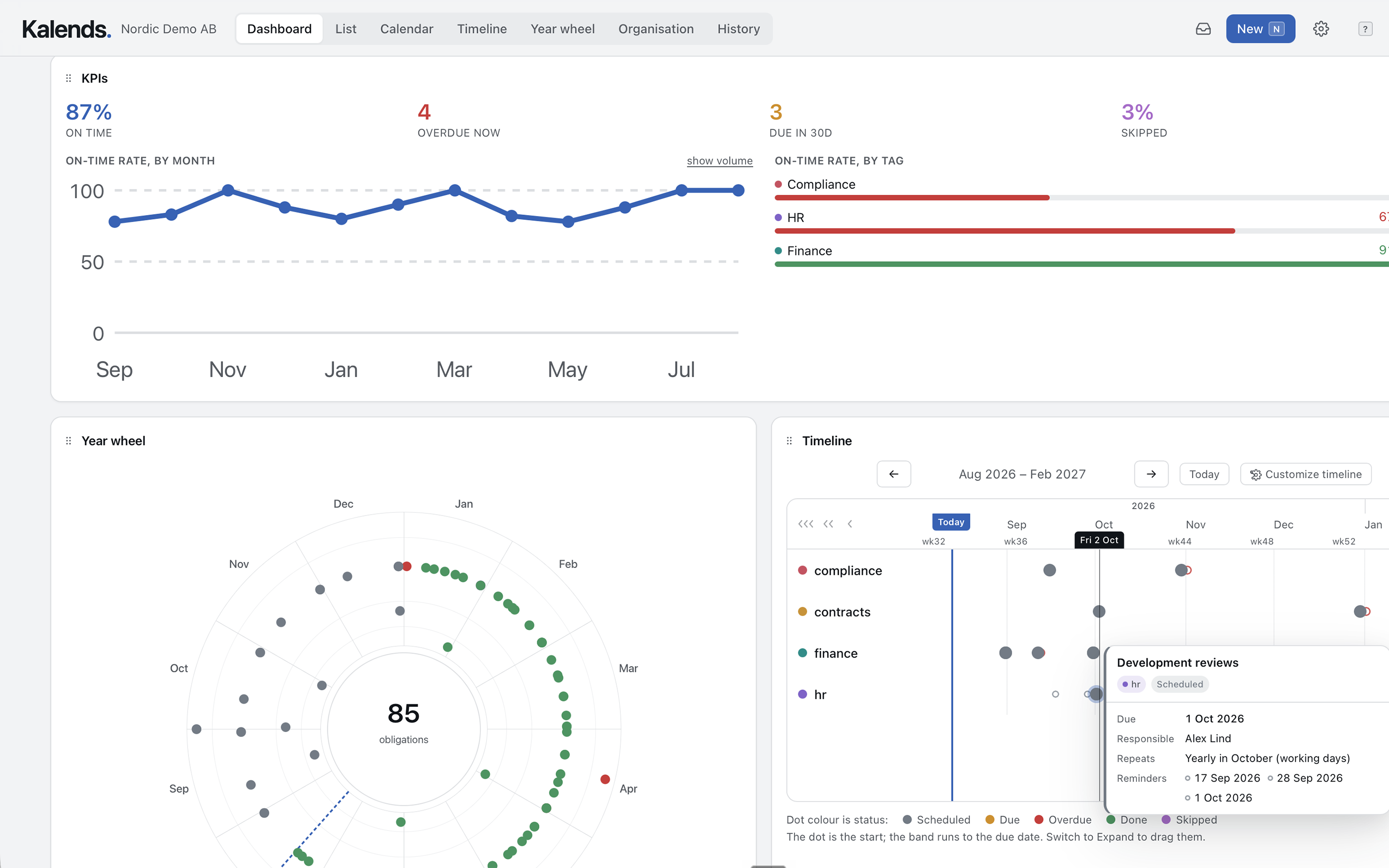
See coming commitments gathered on one time axis, from a week to a year. Each commitment gets its own lane, which makes what is approaching easy to read.
Year wheel
See the rhythm of the year at a glance, and use presentation mode to show the organisation's commitments clearly and visually.
History
An audit trail for authorised administrators: confirmations, comments, reminders, escalations and changes, in the order they happened.
Dashboard
Build your own dashboard with widgets for whatever needs attention: late, upcoming and escalated commitments, and follow-up over time.
Return
Why Kalends?
Promising things is easy; knowing whether the company actually lives up to them is harder. A single missed commitment can cost more than Kalends does in a whole year.
Avoid painful misses
Watch notice periods, filings and recurring requirements before they turn into extra cost, damaged trust or unnecessary stress.
Understand and improve how the company works
Kalends gives you a map of the organisation's recurring work — and shows where ownership or routines need improving.
The company's obligations stay with the company
Kalends gathers recurring commitments, ownership and history in one shared register. Through illness, holiday, a change of role or somebody leaving, the work remains and can be taken over without being tied to particular individuals.
A shared overview, clear ownership
Shared calendars and to-do lists tend to acquire an informal owner, while everybody else looks in occasionally. Kalends makes commitments visible to the right people while keeping a clear owner and follow-up for each one.
Getting started
Map one area at a time
Choose where to start
Begin with an area where recurring work matters, or where there are important dates that must not be missed: finance, HR, customer accounts or one particular service.
Take stock of what recurs
Go through core processes, recurring meetings, policies, documents and contracts. That is usually where the commitments without clear follow-up are hiding.
Make the commitments visible
Put them into Kalends with an owner, a rhythm and the dates that matter. Set up reminders and follow-up where they are needed.
Carry on area by area
Once an area is visible and working in Kalends, move on to the next. The register grows as you discover the business.
Pricing
The price mainly follows how much responsibility you gather in Kalends. Every plan also covers the users, history and features the register needs to work day to day.
Start
For small teams bringing their essential recurring routines into one place.
- Commitments
- 25
- People
- 3
- History kept
- 90 dagar
- List, calendar, timeline and year wheel
- Saved views and shared dashboards
- Sign-off with evidence and waivers
- Private commitments
- Automatic escalation
Team
For companies that need clear ownership, escalation and a shared overview.
billed annually · $948/year
- Commitments
- 250
- People
- 25
- History kept
- 1 years
- Everything in Start
- Private commitments
- Access-controlled tags
- Automatic escalation
- Cover while somebody is away
- Guest accounts, single sign-on and API access
Business
For organisations with higher requirements for traceability, access control and audits.
billed annually · $2,988/year
- Commitments
- 1,500
- People
- 100
- History kept
- 3 years
- Everything in Team
- Guest accounts for consultants and auditors
- Single sign-on
- API access
Enterprise
For groups and organisations with specific hosting, retention and support requirements.
- Commitments
- Unlimited
- People
- Unlimited
- History kept
- Your policy
- Everything in Business
- Unlimited commitments and people
- Retention set to your own policy
- Named support contact
Team and Business include a 30-day trial. After that, choose the plan that suits you.
Private commitments are included from Team and do not count towards the organisation's limit.
Questions and answers
Common questions about Kalends
Is Kalends just a shared calendar?
No. A calendar coordinates time, place and attendees. Kalends keeps track of the company's commitments: who is responsible, when they are due and how they have been followed up. A recurring meeting can exist in both systems.
Isn't Kalends just an ordinary to-do list?
No. To-do lists and issue trackers like Jira are built to organise and drive work through tasks, usually inside a project. Kalends complements them by keeping track of the company's own, lasting commitments — recurring processes, obligations in contracts and promises that have to be followed up over time.
Shared to-do lists also tend to become person-dependent: one person holds the list together and everybody else assumes that person has it covered. Kalends is tied to the organisation, not to an individual user.
What happens while somebody is away?
Appoint a temporary stand-in for a fixed period or until further notice. The stand-in receives reminders and escalations while the long-term ownership stays put. Cover ends automatically after the inclusive end date, or when the person or an administrator confirms the return.
What happens when the person responsible leaves?
The commitment and its history stay with the company. Hand each responsibility area and recurring commitment to the right successor from its next occurrence, without earlier confirmations, comments or evidence disappearing.
Where is our data stored?
In Sweden. Each organisation's data is separated from every other organisation's at the database level.
Can we export our data?
A structured export is planned. Until then all the information is available inside Kalends. Get in touch if you need help getting data out sooner.
Which languages are supported?
Kalends is available in Swedish and English today. More languages will be added based on demand — do get in touch if yours is missing.
Do private commitments count towards the price?
Private commitments are included from Team and do not count towards the organisation's number of commitments. Colleagues can use private tags without it becoming a pricing question for the company.
Does Kalends include AI chat?
Yes. The built-in AI chat can help you explore the register and work with commitments in Kalends. Your organisation supplies its own API key (BYOK) and chooses OpenAI, Anthropic or Google Gemini. Only the active provider receives your questions and the relevant Kalends context; provider usage is billed directly to your own account.
Try Kalends with your own commitments
Thirty days with full access to Kalends Enterprise, no card details, cancel whenever you like.